Flat versus tiered
Your current offer and up to three tiers, compared on margin.
Product · Tools
Product · Intel loops · recurring, in build
Solutions · By problem
Solutions · Online stores
Resources · Learn
Resources · Guides and ideas
Resources · Company
Compare your current flat offer with tiered offers (spend over a threshold, get a larger discount) and see what each one does to your margin, including how far order values must rise for a tier to break even.
Live Live and free. Runs in your browser; your figures are not sent to us.
A free calculator that compares your current flat discount with up to three spend-threshold tiers, and shows the margin each costs or earns from your own figures.
A flat discount is easy to run and easy to overspend on. A tiered offer, with a bigger discount above a spend threshold, can lift order values. It can also hand margin to customers who would have spent that much anyway. Which one happens depends on your margin, your order values and how many customers take the offer. This tool works it through.
You enter your gross margin, average order value and monthly orders, your current flat offer and how many customers use it, and up to three tiers, each with a threshold, a discount and the share of customers you expect to take it. You can also add an expected shift in order value.
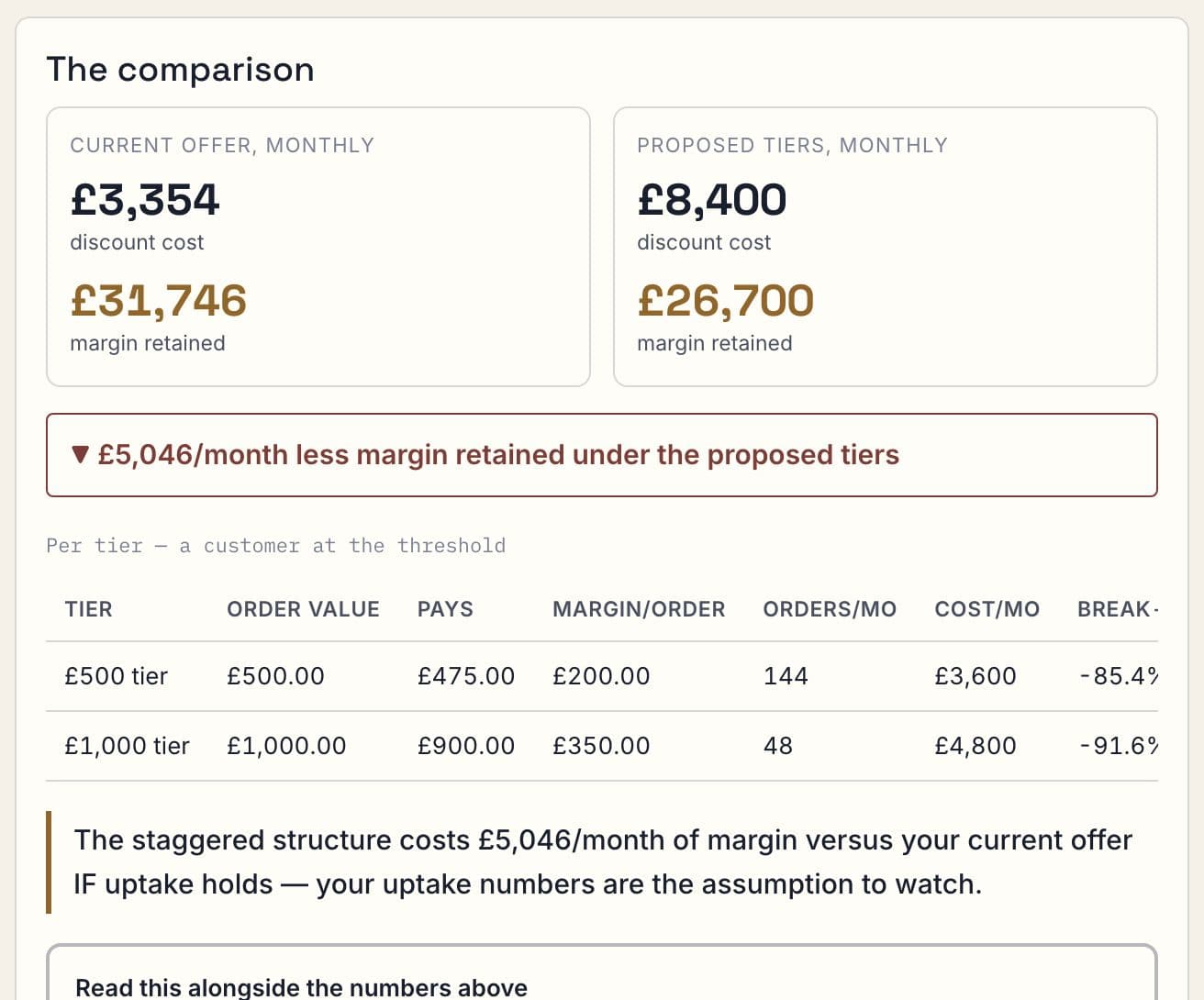
For each tier the designer works out the qualifying order value, the discount paid, the margin left on each order and the monthly cost of the offer. It then compares the baseline with no offer, your current offer, and the proposed tiers, and states the monthly difference. For each tier it also shows the rise in order value needed to break even. When a discount is larger than your margin, it flags the tier as unrecoverable: no rise in order value can rescue it.
Uptake is your assumption, and the tool treats it as one. Everything runs in your browser; your figures are not sent to us.
Your current offer and up to three tiers, compared on margin.
How much order value must rise for a tier to pay for itself.
A tier whose discount exceeds your margin is flagged as unrecoverable.
Baseline, current offer and proposed tiers, side by side.
What switching to the proposed tiers would change, per month.
The order-value rise each tier needs.
When a tier cannot pay for itself at your margin.
Margin, average order value, orders and your current offer.
Threshold, discount and expected uptake for each.
Margin, monthly difference and break-even, per tier.
From your store's reports on past offers if you have them. If not, try a cautious figure and a generous one and compare.
The rise in average order value a tier would need for its margin to match the baseline. If the discount is bigger than your margin, no rise is enough, and the tool says so.
No. It runs in your browser and sends nothing to us.
No. You enter the figures yourself.
Live and free. Runs in your browser; your figures are not sent to us.