Net, not gross
The margin you keep after the incentive, on recovered orders only.
Product · Tools
Product · Intel loops · recurring, in build
Solutions · By problem
Solutions · Online stores
Resources · Learn
Resources · Guides and ideas
Resources · Company
Put in your abandoned carts, cart value, margin and recovery rates, and choose an incentive. The calculator shows the margin you keep after paying for the incentive, and what each extra point of recovery is worth.
Live Live and free. Runs in your browser; your figures are not sent to us.
A free calculator that works out what recovering more abandoned carts is worth to you in margin, after the cost of any incentive, from your own figures.
Cart recovery is sold on revenue: recover more carts, make more money. A recovery email with a discount costs margin on every order it wins back. The question is what you keep. This calculator answers it from your own numbers.
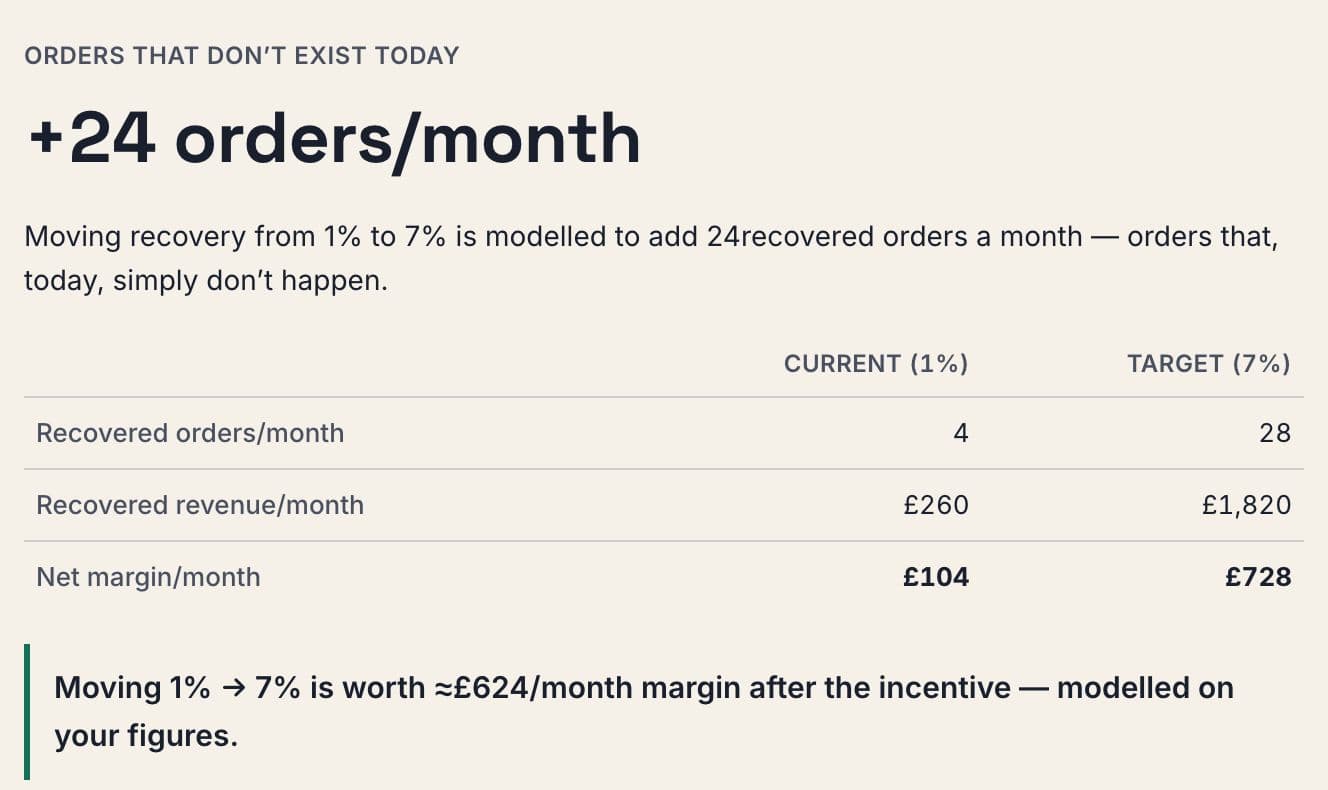
You enter your abandoned carts per month, your average cart value, your gross margin, your current recovery rate and the rate you are aiming for. Then you choose an incentive: none, a percentage discount, or a flat delivery offer. The calculator works out recovered orders, the revenue they bring and the gross margin on that revenue, then subtracts the incentive, charged only on the orders it recovers, to give a net margin figure.
It shows the current and target positions side by side, the extra orders, revenue and net margin between them, what each additional point of recovery is worth, and a small sensitivity table so you can see how the answer moves if your assumptions are a little off.
Everything runs in your browser. Your figures are not sent to us, and nothing is stored. Enter a value outside a sensible range and the calculator pulls it back and lists the adjustment on the result.
The margin you keep after the incentive, on recovered orders only.
What each extra point of recovery rate is worth, per month.
How the answer moves as the assumptions shift.
What moving from your current to your target rate is worth after the incentive.
What each extra point of recovery is worth.
Whether a discount or delivery offer pays for itself at your margin.
How much the answer depends on your assumptions.
Carts, cart value, margin and recovery rates.
None, a percentage discount or a delivery offer.
Net margin, the value of a point and the sensitivity table.
No. The calculator runs entirely in your browser and sends nothing to us.
Your email or cart recovery platform's reports. If you do not have one, try a cautious figure and look at the sensitivity table.
Because a recovery discount costs margin on every order it wins back. Revenue alone overstates the gain.
Inputs outside a sensible range are pulled back to the nearest sensible value, and the result lists every adjustment it made.
Live and free. Runs in your browser; your figures are not sent to us.